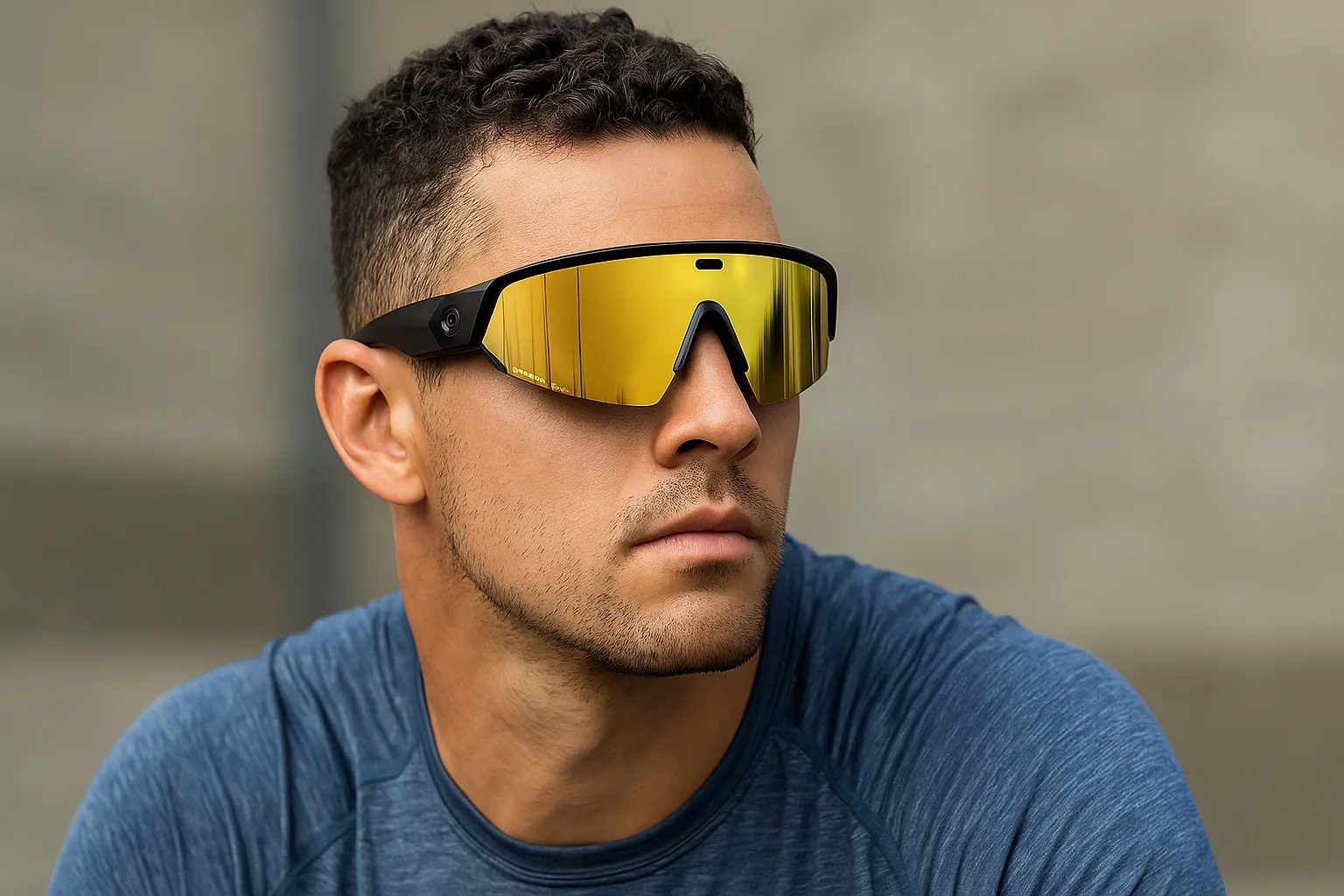
The Oakley Meta Vanguard blends high-tech functionality with rugged sports eyewear design, delivering an integrated camera, audio, and AI assistant to meet the needs of athletes and outdoor enthusiasts. In essence it’s a pair of performance sunglasses with a built-in 12MP ultra-wide camera, open-ear speakers, and on-board Meta AI. This review dives into the Vanguard’s evolution of smart eyewear: from its durable construction and high-contrast Prizm™ lenses to its real-time Garmin and fitness app integration. We’ll also explore how this device elevates training through hands-free photo/video capture and spoken coaching cues, as well as any limitations such as lack of an AR display or prescription compatibility. By the end, you’ll know whether the Oakley Meta Vanguard deserves a place in your athletic gear.
Design and Build Quality
The Oakley Meta Vanguard feels like a true sports sunglass rather than a tech gadget. Its frame is constructed from Oakley’s lightweight yet tough O-Matter™ plastic, engineered to resist extreme temperatures and impacts. Oakley’s signature Three-Point Fit and adjustable nose pads (three sizes provided) ensure the glass rests securely on the nose and head without excessive pressure. Combined with Unobtainium®-coated temple tips (grippy rubber that actually adheres as you sweat), this prevents slipping even on long runs, rides, or hikes. The 66 gram weight is modest for a tech-filled device, and importantly this mass is balanced strategically across the frame so it doesn’t feel front-heavy. In practice the Vanguard stays glued to the head under high-motion activities — reviewers noted it “won’t quit” even in vigorous sprints or climbs. The wraparound shield lens also integrates seamlessly under helmets and allows full peripheral coverage. Unlike many fashion-smart glasses, the Meta Vanguard embraces a bold, full-coverage shape: a large reflective visor lens spans the entire front frame and extends into the temple arms. This maximizes eye protection and blocks wind from your cheeks, which runners and cyclists will appreciate.
-
Frame and Fit: The rigid full-wrap lens is paired with thick, durable sidearms that angle firmly around the ears. Oakley includes three nose-bridge inserts, letting users adjust the height and tilt of the glasses. This customization means even smaller faces can achieve a snug fit. The temple arms are flexible yet sturdy, bending to accommodate helmets or hats. A small power button on the left arm allows you to simply use the Vanguards as regular sunglasses when you don’t need the “smart” features.
-
Weight Distribution and Comfort: At 66g, the Meta Vanguard is heavier than a typical Oakley fashion sunglass but lighter than some competing smart models. Crucially, testers did not notice discomfort while biking or running. The extra weight helps the glasses remain stable; in windy or rapid movements, they stay put whereas ultra-light frames might bounce. The open-ear speaker housings at the ends keep pressure off the ears, and the single-piece nose assembly fits naturally.
-
Water and Dust Resistance: Unusually for smart glasses, the Meta Vanguard is rated IP67. This means it is dust-tight and can handle immersion in up to 1 meter of water for short periods. In simpler terms, it’s sweatproof and splash-resistant enough for heavy downpours or muddy trails. Oakley explicitly warns against high-speed water activities (like skiing through spray or surfing), but under normal rain or sweat the Vanguard handles moisture with no issue. Internally, the frame is sealed against sweat and dust, a point Oakley highlights (“performance without compromise”). This contrasts with many earlier smart glasses that had only minimal splash resistance; athletes can trust the Vanguard to survive a rugged weekend.
-
Lens Coverage and Helmet Compatibility: The wraparound lens covers almost the entire eye socket and even parts of the cheeks. This full field of view is ideal for fast sports (everything is protected, and you won’t miss peripheral cues). Oakley engineered the shape so that the underside of the lens tucks under most bike and ski helmets’ visors without discomfort. Even with a baseball cap or bike cap, the nose angle leaves enough clearance. The wide temples do protrude out a bit, so extremely wide-brimmed hats might not fit flush, but in practice most athletic caps and helmets work well.
-
Build Quality: Beyond water resistance, the Vanguard’s frame feels rock-solid. There are no loose parts or creaks; the single-piece construction houses the camera and electronics, yet maintains a sleek profile. The hinges are smooth and durable (the glasses fold into a hard-shell charging case that doubles as a protective pack). Oakley’s attention to durability is clear: the glasses are rated to survive extreme heat/cold tests, and most reviewers note the sturdy feel. The case itself is hefty at about 258g and protects the glasses, while providing extra battery capacity. (Note: There is no charger port on the glasses — they only charge when docked in the case, which must be connected by USB-C.)
Key Design Takeaways:
-
Rugged O-Matter frame with IP67 water/dust seal
-
Universal fit with 3-point contact, multiple nose pads, rubberized tips
-
Full-wrap lens for maximum eye coverage and helmet compatibility
-
Integrated charging case and durable build tuned for sport
Prizm™ 24K Lens Technology
Central to the Vanguard’s performance is its lens: in this model the lens color is Prizm™ 24K, a bright gold-mirror tint optimized for sunny conditions. Oakley’s Prizm™ line uses special dye layering to enhance color and contrast. The 24K lens has a light transmission of roughly 11%, cutting glare dramatically in intense sun. You’ll notice the world through 24K lenses appears warmer (golden hues) and details pop — for example, potholes or changes in pavement become more visible on a ride or run. Like other Oakley Prizm lenses, the 24K offers full UV protection (100% UVA/UVB shielding)and filters out harmful blue light as well.
-
Bright Light Optimization: In the brightest daylight (snow, high-altitude sun, deserts, etc.), Prizm 24K excels. It cuts brightness for a more comfortable view, yet prizm contrast tweaks make green leaves, road markings, and even ice patches stand out. One reviewer noted that despite the heavy tint, the lenses did not create any weird blind spots or distortion — the polarized look was minimal. (Note: these lenses are not polarized, but the contrast gain can sometimes make reflections less blinding.)
-
Contrast and Clarity: Compared to a standard grey sunglass lens, Prizm 24K adds contrast to reds and yellows, making trail ruts or cracks more evident. If you move your head slightly while running or biking, you’ll see edges sharpened. The higher contrast is especially helpful for discerning terrain changes in the periphery.
-
Lens Variants (Sport-Specific Tints): Oakley offers the Meta Vanguard in four prizm options: 24K (gold), Road (rose-red), Black (smoky grey), and Sapphire (blue). Each suits different conditions:
-
Prizm 24K (Gold): Best for intense sun and high contrast needs. Ideal for bright road cycling, snowboarding, or running in noon sun.
-
Prizm Road (Red/Pink): For everyday road use and partly cloudy days. It lets in slightly more light than 24K, with a pinkish hue that still boosts visibility of shadows/cracks.
-
Prizm Black: A more neutral tint, similar to classic dark sunglasses. Good in bright light but offers a subtle contrast boost over plain grey. It’s versatile for a range of conditions.
-
Prizm Sapphire: Handles very bright glare (like alpine glare) and has a cooler tint. It slightly brightens dark areas for skiing or bike descents.
Swapping lenses is possible (lens replacement kits sold separately), but the process is firmer than on typical Oakley sports glasses. It’s doable with care but not as quick as popping on a new ski goggle lens.
-
-
Lens Coverage: Because the Vanguard’s lens is so large, you get essentially an unobstructed view. The top edge blocks overhead sun without the need for a hat. Side walls of the lens shield eyes from side glare (unlike smaller frames where light sneaks in). In short, the prism-enhanced shield keeps your vision sharp in all directions.
Note on UV and Safety: All Prizm lenses block 100% of UVA/UVB rays. Coupled with the wrap lens design, your eyes are fully protected from the sun and harmful rays – no squinting needed. The lens also sheds water droplets well (treated to avoid bead-up), so if it starts sprinkling, vision remains clear.
Meta AI Features and Smart Integration
The standout innovation in the Oakley Meta Vanguard is Meta AI – the built-in voice assistant that lets you control the glasses and access information hands-free. By speaking the wake phrase “Hey Meta,” you can ask the glasses to do things or give you data, similar to asking Siri or Alexa. Behind the scenes this uses a phone’s internet connection via the Meta View (Meta AI) app, turning your sunglasses into a wearable interface.
-
Voice Commands: You can tell the Vanguard to take photos and videos (“Hey Meta, take a photo” or “start capturing”). The camera will snap a 12MP photo or record 3K video about 1–3 seconds after the command. You can stop recording hands-free too (“Hey Meta, stop recording”). Voice control also plays/pauses music, adjusts volume, or calls up navigation (“find me the nearest trail” – although with no visual display it will rely on verbal directions from the phone). The dedicated side buttons also duplicate these functions: the larger button on the arm triggers capture (tap for photo, hold for video) if you prefer tactile control.
-
Meta AI Assistant: Beyond basic commands, the assistant is a conversational AI. You can ask real-time questions(“What’s my current pace?”, “How many miles have I done?”) and the glasses will reply through the speakers. It can convert units on the fly (e.g. “How many kilometers is 5 miles?”) and even identify objects or text it sees with the camera (“What plant is this?” or “Read that street sign”). The Guardian reviewer found plant ID and translations very handy during hikes. In practical terms, Meta AI can serve as a lightweight coach or interpreter while you are working out.
-
Integration with Fitness Devices: One of the coolest features is the dedicated integration with Garmin watches and Strava (and other health platforms). By linking the Meta AI app to your Garmin Connect account and installing the Meta app on your Garmin device, the glasses gain in-workout data access. During a run or ride, you can ask “What’s my heart rate?” or “What pace am I on?” without touching your phone or watch – the answer is spoken aloud. The glasses also light up a small LED near your temple to signal your heart-rate zone or if you’re off-pace. This kind of real-time feedback (both audio and visual) keeps you focused on performance, not fiddling with gadgets.
-
Hands-Free Auto-Capture: With Garmin integration enabled, the Vanguard can also auto-capture highlights of your workouts. For example, every kilometer or steep hill can trigger a 5-second clip automatically. The Meta AI app on your phone then stitches these clips into a highlights reel after the workout, overlaying metrics like distance, speed, elevation, and heart rate. This means your eyeglasses essentially acted as a GoPro + coach, grabbing action without you pressing a button. (Note: many reviewers found this “auto-capture” mode fun but sometimes caught unexciting moments too; it’s easy to turn off if it creates too many random clips.)
-
Connectivity and Compatibility: The voice and AI features require the glasses be paired with a smartphone (Android 10/iOS 14.4 or later) running the Meta AI app. The glasses connect via Bluetooth and Wi-Fi to transfer commands and media. In practice, the app is the control center – you enable/disable features, choose which fitness accounts to sync, and update firmware there. Once set up, you can still use core functions independently (like listening to music via the glasses directly from any BT player), but the advanced voice-AI sports features come through the Meta ecosystem.
In real-world use, the Meta AI assistant was reported to be surprisingly capable. It correctly understood spoken requests from mid-activity (up to about 20-30 km/h in tests) and responded naturally. You can converse in multiple languages (English, Spanish, French, Italian are supported) which helps on international adventures. The voice processing happens on the phone/cloud, so a reliable internet connection is needed for answers (though simple tasks like music playback from a local app still work offline). In short, the Vanguard effectively turns your sunglasses into a smart audio interface – you get actionable feedback and data without needing to glance at screens.
Camera and Audio Capabilities
At the heart of the Meta Vanguard is its camera and audio system, which together make it a full multimedia device, not just eyewear.
-
Camera Specs: The 12 megapixel camera is mounted dead-center on the nose bridge, facing directly forward. It has a 122° ultra-wide field of view to capture as much of the scene as possible. Video recording supports up to 3K (3024×4032) at 30 frames per second, plus a slow-motion mode at 720p 120fps and a Hyperlapse timelapsemode for fast-forwarded sequences. The lens doesn’t physically pop off, so there’s no polarization or zoom – it’s a fixed ultrawide setup.
-
Photo and Video Quality: In bright daylight, the camera produces surprisingly clear, stabilized footage that rivals a mid-range action camera. Reviewers describe footage as “good enough to replace a GoPro” for most casual sports recording. The center-mount avoids the fisheye distortion of side-mounted cameras, giving a true perspective of what you see. Videos come out steady thanks to in-app stabilization, even on bumpy runs or fast bike descents (up to ~40–60km/h). The hyperlapse feature (stitching photos into a moving timelapse) works but is relatively basic – it can feel shaky compared to professional implementations. The slow-motion 720p clips are serviceable but visibly lower resolution (suitable for occasional action shots, but not crisp by modern action-cam standards).
-
Capture Modes: You can take still photos or videos via voice or button. By default, a video is set to 1080p 30fps lasting 60 seconds, but you can adjust in the app to go up to 3K video for up to 5 minutes per clip. Once recording, the glasses emit a quiet beep to signal start/stop, and the LED on the front lens blinks slowly during filming. Photos are instantaneous with a 1-3 second delay after the voice command. There are no optical zoom or focus adjustments – it’s fixed to capture everything sharply from about 1m to infinity.
-
Storage and Transfer: The glasses have 32GB of internal storage, enough for roughly 100+ thirty-second videos or 500+ photos. Media is transferred via the charging case: when docked and connected to Wi-Fi, the case automatically uploads all new content to Oakley’s cloud (much like GoPro’s cloud service). You then access and download your files from the Meta AI app. Be aware: direct USB transfer to a computer is not available, so if you skip Wi-Fi setup, you’ll have to use the app’s connection or manually capture via phone tethering. The cloud sync is convenient but means your footage lives on Meta’s platform until you export it.
-
Open-Ear Audio: Flanking the frame are two tiny speakers that deliver stereo sound into your ears without blocking them. These open-ear speakers are impressively loud and clear for their size: in tests users could easily hear music at 40MPH on a bike. The sound quality is excellent for spoken word, voice commands, or energetic playlists. As expected for this style, they lack bass of in-ear headphones, but the mids and highs are crisp. Because your ears remain open, you can still hear ambient traffic or conversation, which is safer for outdoor use.
-
Microphone Array: Built into the frame are five microphones using beamforming tech to pick up your voice. They did an excellent job filtering wind and road noise in reviews. You can have clear phone calls (the glasses act like Bluetooth headphones for calls) even in noisy environments. The mics also handle the “Hey Meta” commands at a good distance (around 30 kph speed before voice recognition started to drop).
-
Safety and Awareness: Since the audio is open-ear, you remain aware of your environment. You can hear sirens, cyclists, or nature sounds while enjoying music or prompts. The frame itself does not include any heads-up display (HUD) or visible screen – all information is communicated by voice (spoken responses) or via that small temple LED indicator for metrics. This choice avoids any distraction in your field of view, but also means no visual overlay of data (unlike AR glasses).
What Reviewers Noted:
Reviewers consistently praise the audio as a highlight – louder and clearer than many competing “audio glasses.” Video stabilization and quality impressed most testers, claiming it makes on-the-go recording trivial. However, they caution that heavy filming (especially long 3K videos, Hyperlapse, or frequent auto-capture) will drain the battery much faster.
Sports and Lifestyle Use Cases
The Oakley Meta Vanguard is squarely aimed at active lifestyles. Its features shine during workouts, races, and adventures, rather than in office or casual social use. Here’s how it can fit various athletic scenarios:
-
Running & Trail Running: The Vanguard lets runners keep eyes forward, capturing trails as they go. You can ask for pace, distance, or heart rate with a voice prompt, without stopping or checking a watch. Music and audio cues play through the glasses, providing motivation while leaving ears open for traffic. The auto-highlight feature can record your best climbs or sprints without your intervention. Even in marathon training, Oakley claims the battery can last a full race with moderate usage; in tests, a heavy-use one-hour run still left some charge. The secure fit ensures the glasses stay in place mile after mile. Photo/Video: capturing stride videos or training routes is seamless.
-
Cycling: Road and mountain bikers benefit from the wrap shield lens protecting against wind and debris. If integrated with a Garmin Edge or cycling watch, you can get turn-by-turn navigation or training metrics announced in your ear. The open audio means you still hear approaching cars. When descending, you can shout “record a clip!” and the glasses will film the view in front of you. In crashes or bumpy trails, the camera is steady and the frame stays on the helmet securely. The 122° FOV is wide enough to show handlebar perspective without a selfie-stick. One caveat: the top of a road bike helmet might press lightly against the glasses; due to the low profile, this usually isn’t uncomfortable, but very deep helmets may touch.
-
Hiking and Skiing: Outside of cardio sports, the Vanguard doubles as high-tech outdoor glasses. On a hike you might use the AI assistant to identify plants or landmarks (someone at WIRED was impressed how it translated foreign trail signs on the fly). On ski tours or cross-country skiing in winter sun, the Prizm lenses cut glare off snow and the glasses handle snow spray well (though they are not rated for full immersion in water). The robust frame can survive a drop or tumble on rocks. Its ability to play music and even route-voice-guide (via a phone app) makes it a handy trail companion.
-
Gym and Daily Use: Even indoors the glasses have uses. In a gym you could take calls or listen to playlists without headphones, while still hearing coaches or music in the room. Cycling trainers or treadmills connect via Bluetooth for audio. The glasses aren’t overkill for the office; you could connect them to your laptop or phone to video-chat or dictate notes. However, their bold look and large visor are definitely athleisure; they look out of place in a formal meeting. The battery will happily handle a few hours of podcast-ing on your commute or errand run, though care should be taken in extreme crowds or when crossing streets (the plastic lens means others see your eyes as mirrored, reducing eye contact).
-
Hands-Free Training: The biggest draw is hands-free operation. Set your intervals or start/stop music without stopping your workout. Ask the coach-bot (Meta AI) for splits and get instant feedback (e.g. “How was lap time?”). For sports like rowing or boxing where hands are occupied, this is ideal. You can pair the glasses with popular fitness services: walk, run, or bike data from Garmin, Apple Health, or Strava all feed into the Meta app. Oakley’s site highlights Strava sharing: after a session you can post your highlight reels and overlay data on them to social media directly. In short, the Meta Vanguard blends into athletic routines by tracking and recording without disrupting them.
Use-Case Highlights:
-
Endurance Athletes: Track performance metrics (pace, heart rate, cadence) vocally while you push limits. Capture POV footage for reviewing form or sharing achievements.
-
Outdoor Adventurers: Navigate trails, translate road signs, ID wildlife with your eyes forward. Protect eyes from elements, stay aware of surroundings with open-ear audio.
-
Fitness Enthusiasts: Use the glasses like wireless earbuds for music and calls during workouts, with the bonus of real-time audio notifications of progress.
-
Commuters/Cyclists: Play navigation prompts and music with ambient sound safety, and quickly record any unexpected events on the road (sunny traffic incidents or scenic routes).
Setup, Pairing, and the Meta View App
Getting started with the Meta Vanguard involves a few steps, but the ecosystem is designed to streamline ongoing use.
-
Initial Setup: First, install the Meta View app (sometimes called the Meta AI app) on your smartphone (available for iOS and Android). Create a Meta (Facebook) account if you don’t have one, as the glasses use Meta’s cloud for AI and media. The app will guide you to connect the glasses via Bluetooth and Wi-Fi. You’ll enable the glasses to join your home Wi-Fi; this lets the charging case upload photos/videos automatically after workouts. (The glasses themselves have no USB port or independent Wi-Fi; everything goes through the case or direct app link.)
-
Firmware and Settings: On first use, the app checks for firmware updates for the glasses. Keep them updated to get the latest features and bug fixes. In the app you can customize many options:
-
Voice Language: Choose the assistant language (English, Spanish, etc).
-
Wake Phrase: “Hey Meta” is fixed, but you can mute ambient wake-word for privacy.
-
Auto Shutoff: Set the glasses to turn off after inactivity (to save battery).
-
LED Indicator Behavior: Decide what the small lights indicate (e.g. recording, charging).
-
Speaker Volume: Separate volume for voice prompts vs. music.
-
Music Services: Link streaming services (Spotify, Apple Music, etc) so voice can control them directly.
The app’s interface allows browsing your gallery of captured photos and videos, trimming clips, and viewing AI-generated highlights.
-
-
Linking Fitness Services: A major step is connecting your fitness accounts. In the Meta View app, you’ll link to Garmin Connect and/or Strava (and even Apple Health or Google Fit). This lets the glasses fetch your workout data. For Garmin, you also install the Oakley (Meta) app on your Garmin device via the Garmin ConnectIQ store. This two-part link (phone app to Garmin account, Garmin app to device) enables the real-time stats and overlays. Once done, any tracked workout will sync with the glasses via your phone. For Strava, you grant Meta app access; then you’ll be able to choose a Strava activity to pair with your glasses’ videos when sharing highlights.
-
Camera Controls: In the app you can set defaults for photos/videos: e.g. choose default video resolution (1080p vs 3K) and maximum length. You can also configure whether audio is included in videos. Although voice can trigger captures, you can also always use the physical shutter button on the right temple to take photos or long-press for video — useful in noisy environments where the microphone struggles.
-
Troubleshooting & Updates: If you lose connection or want to pair the glasses to a new phone, use the app’s reset feature. The Oakley FAQ also notes the glasses may not charge if placed incorrectly in the case; make sure they click firmly on the charging pins. The case itself needs a standard USB-C cable (not included in the box by Oakley, as part of an eco-effort) and can be recharged from a wall charger or power bank.
Note on Battery Management: The app will show current battery levels for both glasses and case. It’s wise to charge the case fully before a long session. The case provides multiple recharges on the go – each trip to the case yields about 75 minutes to 50% charge for the glasses. Overall, think of the case as a portable power bank that automatically replenishes your glasses whenever you stow them between workouts.
Battery Life and Charging
Battery life on the Meta Vanguard varies with use, but Oakley provides solid baseline figures:
-
Active Use (Mixed): Up to 9 hours on a single charge under moderate use. This is described as tasks like audio streaming, some voice commands, and occasional photo/video capturing. In practice, heavy video recording or numerous voice queries will reduce this.
-
Continuous Audio/Call: Up to 6 hours of nonstop music playback or voice calling. This matches typical Bluetooth earbuds with a similar-sized battery.
-
Charging Case: The supplied hard-shell case carries an additional 36 hours of charge (roughly four full charges of the glasses). It’s like a dock and a power bank combined. The case also automatically syncs data while charging.
In tests, these numbers held up reasonably well. One reviewer was able to go a full week of daily hikes without needing to recharge the glasses themselves (only the case was tapped for supplemental power). Another found that a 1-hour intense workout (with music on and many video clips) still left 25% battery at the end. As a rule, if you minimize filming and heavy AI queries, you can hit near the 9-hour spec. The fast charge is nice: it takes about 75 minutes to fully charge from zero (Oakley quotes 0–50% in 20 minutes, which was confirmed by testers).
-
Charging Process: To charge, simply snap the glasses into the case. The case LED indicates its own charge level and that of the glasses. One clever detail: the case will automatically begin uploading any new media via Wi-Fi once the glasses are docked and the case is on charge. Note the glasses themselves have no other charging port; if you lose the case you can’t recharge them. (And indeed, the Guardian review notes this as a drawback – if the built-in battery eventually degrades or fails, the glasses are essentially disposable.)
-
Real-World Scenarios: For most athletes, the workflow is: after a session, put the glasses back in the case. They charge up quickly and your workout footage syncs to your phone. If you’re on a long expedition, you might carry the case to recharge the glasses between activities. If using all-day (music on commute, calls, workout tracking), you may need a brief 30-minute top-up at some point to ensure you hit the day’s targets.
Power Management Tips:
-
Turn the glasses off manually (long-press power button) if you just want to use them purely as sunglasses without AI.
-
Disable Wi-Fi or Bluetooth in the app when not needed to save juice.
-
Keep the auto-off timeout enabled so they sleep when idle.
User Comfort and Wearability
Because the Vanguard is meant for extended use, comfort is critical. The design addresses this in several ways:
-
Adjustable Fit: With three interchangeable nose bridge inserts, you can achieve an ideal fit. During fitting, try the higher vs. lower pads to see which holds without sliding. This eliminates one of the classic problems of smart glasses in sports: slippage from sweat. Oakley’s reviewers noted that even on downhill runs, the nose grip kept the glasses firmly in place.
-
Temple Pressure: The ear stems are not overly tight, yet thanks to Unobtainium they grip when you perspire. Users report no aching at the temples or behind the ears, even after hours. The wide, gently curved temples distribute pressure along the skull comfortably. If you wear them with a cycling helmet, the temples tuck under the helmet straps without pushing into the ears.
-
Heat and Sweat: The lens and vents allow some airflow around the eyes. The open vented design at the top of the lens (where the camera sits) also helps to reduce fogging; the lens is far enough from your face that condensation isn’t a major issue even during intense cardio. The materials are sweat-resistant — no oily spots or corrosion on the frame from salty sweat.
-
Hat and Helmet Compatibility: We mentioned helmets, but the Vanguard also plays well with sports caps. The brim of a baseball cap sits comfortably above the lens; your headgear will not knock against the lens. The 3-point nose support means even overhead weight (a ski helmet) doesn’t dislodge the glasses.
-
Weight Perception: It’s worth emphasizing that despite having electronics, the Vanguard does not feel heavy. The balanced mass means you quickly forget it’s on your face. The open-ear speakers are nearly weightless on the temples. In contrast, many smaller smartglasses feel front-heavy; this one’s design avoids that common pitfall.
Long-Session Comfort:
-
On runs of 10+ miles or long bike tours, testers report minimal discomfort. The only caution is that at around 6-9 hours of continuous wear, you might feel mild tension where the nose pads meet your skin. Oakley addresses this by providing a soft silicone inner pad on the nose and additional removable covers. If you do experience pressure after very long use, it’s usually adjustable by repositioning the nose pad.
-
There are no bone-conduction components touching the ears, so you won’t get any vibration buzz that some headphones cause. The temple speakers merely sit near your ears.
-
Because the glass fit is snug, the glasses do trap a little bit of your body heat around your eyes and cheeks on hot days, but not enough to cause discomfort (again, compare to thick foam ski goggles which trap far more heat).
In summary, the Oakley Meta Vanguard is designed to be worn all day during athletic pursuits. It avoids common discomforts of headsets, and the smart-adjustable fit system means most users will find a stable, comfy fit quickly.
Privacy, Safety, and Compliance
Whenever you have a camera and always-on microphones on a wearable, privacy and safety are key considerations. Oakley has built in some measures, and there are general guidelines for responsible use:
-
Recording Indicators: The Vanguard has a visible status LED on the front, above the camera. It blinks when the camera is active or when taking a photo, signaling to others that recording is happening. In practice this LED is somewhat subtle (Oakley made the surrounding frame reflect light to soften its glow), but it is visible if someone looks closely at the glasses. You and anyone nearby will likely notice a light signal if you press the capture button or say “Hey Meta, start recording”.
-
Audio Alerts: In addition to the LED, the glasses emit a small audible beep when they begin and end recording video. This lets the wearer and anyone close by know the capture state audibly. It’s an important cue so you don’t accidentally continue filming indefinitely without realizing.
-
Microphone Transparency: All microphones are listening when the device is powered on (for the “Hey Meta” keyword). There is no physical on/off switch for the mic; you control it via settings. Users should assume the glasses can hear voice commands at all times (similar to a smart speaker or phone). In private or sensitive environments, it’s wise to keep the device off or in a disabled state if possible.
-
Public Usage: Legally, rules vary by region, but in most places you cannot film people without consent in private spaces. In public or at outdoor events, it’s usually legal to record yourself and your surroundings, but always use common sense. Athletic events (like races) may have policies about photographers or videographers, so check before using the glasses to capture participants.
-
Ambient Awareness: Since the design leaves ears open, your hearing of the environment is uninterrupted. This aids safety: you can hear traffic, warnings from others, or obstacles. The glasses do not block your vision (no screen, no dark frame obstructing sight), so the only caution is not letting the novelty of voice commands distract you while in hazardous situations. For example, ask questions at safe times.
-
Legal Compliance: The device complies with FCC regulations (consumer device rules), and Oakley clearly states you need to be aware of laws like consent for recordings. Check local rules if you plan to do a lot of public recording (some regions require a beep or visible light, which the Vanguard provides). For athletes, the main safety note is that these glasses are not night-vision or low-light optimized – in darkness, the camera quality drops off, and of course you still need to be visible in traffic if it’s not well lit.
-
Personal Data: Everything captured is stored on the device (and cloud); Oakley and Meta share that content via the cloud with your permissions. There’s no built-in privacy mode for images – assume all media syncs once you dock and connect Wi-Fi. Oakley’s terms note that images go to the Meta cloud by default, so do not film anything you want to keep off the internet.
In short, treat the Meta Vanguard like any camera-equipped gear: signal your intent to record, respect others’ privacy, and follow relevant laws. The hardware provides cues (LED/beep) to help, but responsible use is up to you.
Limitations and Areas for Improvement
No device is perfect. Here are the main limitations of the Oakley Meta Vanguard as observed in practice:
-
No Heads-Up Display: Unlike some smartglasses concepts, the Vanguard does not have an AR or HUD screen. All data is delivered by voice or audio, with no visual overlay on the lens. This means you cannot see maps, text messages, or workout stats in your line of sight. For users who hoped for a full on-eye display, this is a feature gap. Oakley deliberately avoided a visual display to save weight and battery, focusing on audio instead.
-
Prescription Compatibility: There is currently no easy option for prescription lenses. The face-shield style lens is interchangeable only for Oakley’s own tinted versions. If you wear glasses or contacts, you either need contact lenses or accept some visual compromise. Oakley may release prescription inserts in the future, but for now this is a drawback for those needing correction.
-
Low-Light/Night Use: The available lenses are tuned for daylight. There is talk of a “low-light option” coming, but at present none is released. So if you run or bike at dusk or dawn, vision is not optimized. The gold Prizm lenses are too dark for low light; Oakley’s “Black” tint is lighter but not ideal for dim conditions. Better also to highlight that the camera’s performance in low light is limited (digital noise increases, stabilization struggles).
-
Bulk and Style: The Vanguard’s aggressive wrap design is fantastic for sport but not subtle. They look like serious racing sunglasses, not everyday wear. This limits use in a professional or casual setting – for example, you wouldn’t wear them to an office or formal event. They also might not fit small faces or fashion tastes.
-
Heavy Over Long Term: While comfortable, they are heavier than non-smart sunglasses. If all you need is audio or casual use, the extra bulk might feel like overkill. For multi-hour indoor desk work, lighter earbuds would be simpler.
-
Battery Non-Replaceable: The internal battery cannot be swapped out. Oakley’s spec sheet suggests it retains 80% capacity after ~500 full charge cycles, but after that you’re relying on diminishing runtime. Combined with no official repair or trade-in program, the glasses are essentially disposable electronics after their battery ages. This raises sustainability concerns. (For reference, some earbuds allow battery replacement, but here even the frame is not meant to open.)
-
Dependency on Phone and Cloud: Many advanced features (AI assistant responses, auto-capture stitching, translations) need a smartphone and Meta’s servers. If you go into a region with no service, you lose voice query capabilities. Even voice-activated music from streaming requires a connection. Some users found it odd that you have to carry your phone for full functionality, so it’s not a stand-alone device.
-
Lack of Apple Integration: The glasses do not natively integrate with Apple Watch for real-time stats (unless you force data through Strava/Health). For iPhone users without Garmin, you miss out on in-run voice stats.
-
No Wired Connectivity: Everything is wireless; some sports users wish for a 3.5mm jack or Bluetooth low-latency mode for games. That said, it’s beyond the target use case. But it means no wired music option, and the 32GB is fixed with no SD card slot.
-
Hyperlapse and Stabilization Quirks: While the video stabilization is generally good, one test found the hyperlapse mode to be jittery. The stabilization only applies to 1080p, not 3K (since 3K is stabilized after transfer). Most users ended up using 3K and letting the app handle smooth-out. On a rare occasion, a long video was inexplicably warped (magically zooming), though this was an outlier.
-
Overkill for Casual Music Use: If you just want open-ear headphones with sunglasses, the Vanguard has more tech than necessary (and at a much higher price point, of course).
Comparison with Other Smart Glasses (Performance vs. Lifestyle)
Within the growing field of smart eyewear, the Oakley Meta Vanguard occupies a distinct niche. To remain neutral, we won’t name other brands, but rather compare philosophies:
-
Performance-First vs. Fashion-First: The Meta Vanguard clearly falls into the “performance-first” category. Its design language screams sport: aggressive wrap lens, robust frame, and emphasis on metrics. Other smart glasses on the market often prioritize a more fashion-oriented approach. Those models tend to look like ordinary streetwear sunglasses or vintage styles, with multiple frame options and even clear lenses for indoor use. The Vanguard does not try to blend into every social context; it is unapologetically an athletic tool.
-
Durability and Weight: This Oakley model has higher durability (IP67 rating, strong frame) at the cost of being heavier. In contrast, everyday smart glasses may be sleeker and lighter but at lower water resistance. For example, a fashion-smart model might only offer splash resistance (IPX4) and only a few hours of battery, whereas the Vanguard can withstand rain/sweat and lasts significantly longer. The trade-off is clear: other glasses are more discreet and suitable for all-day casual wear, while the Vanguard is built to withstand physical rigor.
-
Audio Quality: The open-ear speakers on the Vanguard are among the loudest and clearest in the class. Many fashion-smart glasses deliver more subdued sound or use bone-conduction. Here, Oakley gives up some sleekness for raw output and wind resistance. If your priority is pumping high-volume audio on a bike without earmuffs, the Vanguard wins. For quiet office listening, a daily-wear model might suffice (though at Oakley’s audio quality, the Vanguard would still be excellent).
-
Camera Placement and Field of View: Unlike some fashion models that tuck a camera in a corner, the Vanguard’s camera is centered, giving a true point-of-view shot. Its 122° field is wider than most competitors. This is clearly intentional for action sports photography. Other glasses might have narrower FOV or emphasize discreet appearance of the camera (some will hardly notice it’s there). Oakley’s choice trades concealment for maximum capture quality.
-
Feature Integration: The Garmin and fitness app ecosystem built around the Vanguard is unique. Typical smart glasses without a sports focus do not integrate deeply with exercise tracking devices. Conversely, they might integrate with consumer apps (music streaming, smart home controls, messaging). The Vanguard’s value comes from this workout-focused integration. If you don’t care about Garmin data, that part is moot.
-
Use Cases: In summary, if you want everyday augmented reality notifications and a more conservative look, other models may be a better fit. If you need robust action-cam functionality, loud audio, and workout data connectivity, the Oakley Meta Vanguard clearly leads. Essentially, it’s like comparing a high-end mountain bike to a casual commuter bicycle: each serves a different rider.
-
Price vs. Value: We won’t quote prices, but we can note: the Vanguard is on the high end of the spectrum. It bundles sunglasses, camera, and headphones into one device. For someone wanting just the sunglasses functionality or just the audio, there are cheaper options. The Vanguard is aimed at those who want it all integrated for sports. In that sense, its pricing is more akin to a full cycling computer plus action cam plus premium shades.
(see more details and availability)
Final Verdict
The Oakley Meta Vanguard is a bold leap forward in smart athletic eyewear. It is exceptionally well-suited for its intended audience: serious athletes, outdoor enthusiasts, and tech-savvy trainers. By combining Oakley’s trusted sports design with Meta’s emerging AI platform, the Vanguard creates new possibilities for hands-free coaching and capture.
-
Who Should Get It: If you’re a runner, cyclist, skier, or any athlete who trains outdoors and values data-driven feedback, the Vanguard can transform how you work out. It’s especially compelling if you already live in the Garmin/Strava ecosystem – the seamless stat narration and highlight reels can elevate your training and storytelling. Adventurers who want to document trips from their own eyes (as opposed to strapping a separate GoPro) will find the glasses handy.
-
Who Might Skip It: If your main need is everyday use (like office or casual setting), the Vanguard might be overkill. Its looks are aggressive and not suited for business attire. Likewise, if you simply want wireless earbuds for music, the price is hard to justify. And if you need prescription lenses, you’ll have to wait for a solution or look elsewhere.
In practice, sports testers have been enthusiastic. They highlight the “game-changing” ability to get real-time stats in your ear and capture first-person POV footage without extra gear. The glasses stay secure under heavy sweat and movement, the audio kicks up motivation, and the lens keeps vision crisp. The integrated system genuinely works as advertised, meaning fewer gadgets to juggle on race day.
However, this sophistication comes at a cost. Besides the steep price tag, you must commit to Oakley/Meta’s ecosystem (Meta account, app, cloud). You will also need to carry your smartphone to unlock all features. And the concept of “smart glasses for sports” is still evolving – there are minor hiccups (auto-capture noise, battery limitations under extreme use, etc.) that we expect will be ironed out by future updates.
Is it worth the investment? For dedicated athletes, likely yes. The time saved (no more fiddling with cameras, phone timers, or checking watches constantly) and the enriched training insights can outweigh the initial outlay. The Vanguard aims to be part of your everyday athletic routine: your new training partner. If your lifestyle involves heavy sweat, GPS watches, and capturing every run or ride, the Meta Vanguard is designed for you. Even for travel or leisure, having both a quality pair of sunglasses and a camera in one gadget is convenient. Just plan to respect its high-tech nature (keep it charged, synced, and treated a bit like the smartphone it partly is).
In conclusion, Oakley Meta Vanguard smart glasses carve out a niche as a top-tier sports gadget. They excel at what they were built for: tracking performance and capturing the action while leaving your hands and ears free. While not a one-size-fits-all device, for the right user this eyewear can indeed change the game — making workouts smarter, multimedia sharing easier, and hands-free training a reality. If your days are filled with miles to run and trails to explore, the Vanguard could be the all-in-one companion that proves worth every feature.
